Does Hotmail Work in China?
By Jian Shuo Wang on 2004-02-05 20:49 · MSNDick asked: “As you see, I have a Hotmail email address. Is there any problem in using this account in China.”
Sure. Hotmail works in China. Althought there is a short preiod of time of block of hotmail (who knows whether it is a block or technical difficulties), it is OK most of time.
There are some very big sites that people in China cannot see. Among them are Geocities.com and blogspot.com.
Update Ways to Access Hotmail May 4, 2006
Recently, I mean more than 2 years after this article was first written, some people report that they cannot access hotmail in China. I experienced the problem sometimes using other providers. Thanks for Mike in Guangzhou’s comment, if you cannot access Hotmail in China, try the following link:
https://login.passport.net/uilogin.srf?lc=1033&id=2
It is reported to work perfectly (I can access Hotmail in Shanghai with Shanghai Telecom FTTB+LAN using the normal login at http://hotmail.com).
Update Hotmail is Blocked May 10, 2006
The content of this original content is out-of-date. With so many people complaining about Hotmail problems, I think it is safe to say Hotmail is blocked in China. The reason people gather in this page is because, it is the top result in Google for Hotmail in China. Wow…
If anyone has any confirmed ways to workaround this problem, please let me know by posting comments. If someone confirmed the methods work, please also let us know, so I can promote the methods here.
Update Hotmail is Blocked May 10, 2006
I posted the workarounds I know in this article: Hotmail Blocked in China. Here is the content of the article.
It is brought to my attention that Hotmail is presently blocked in China. I can access it everyday (I don’t know why, but it just works for me.), but I saw a lot of complains on my old post: Does Hotmail Work in China?. There are 52 comments so far. Why? Because it is the first result for Hotmail China in both MSN Search and Google search.
Well. It seems I need to do a little bit homework to find ways to help people out. Here is my analysis.
The Problem
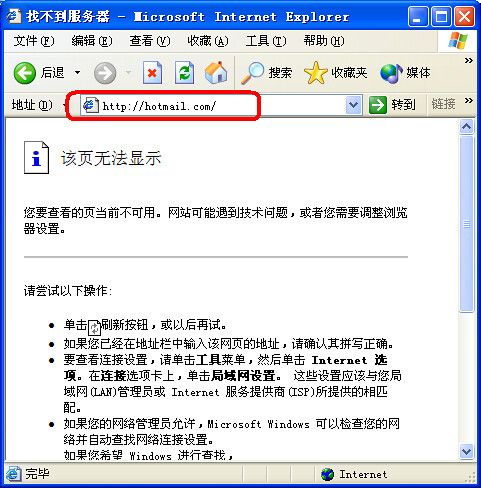
When you type http://hotmail.com or http://www.hotmail.com, you will receive DNS error, as if the site never existed. You may experience long waiting time, before it reports the error.
When you type in http://hotmail.com, it reports DNS error, like the screen capture. Created at 21:40 May 10, 2006 at China Telecom FTTB+LAN in Pudong, China
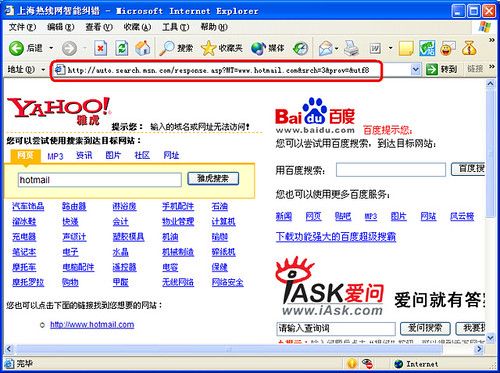
When you type in http://www.hotmail.com, it also return error, but this time, it return the default error page from China Telecom: advertisement from Yahoo! China, including Yahoo! MP3 search, Baidu.com and Sina.com.cn. Created at 21:40 May 10, 2006 at China Telecom FTTB+LAN in Pudong, China
It seems the domain name DNS service is blocked.
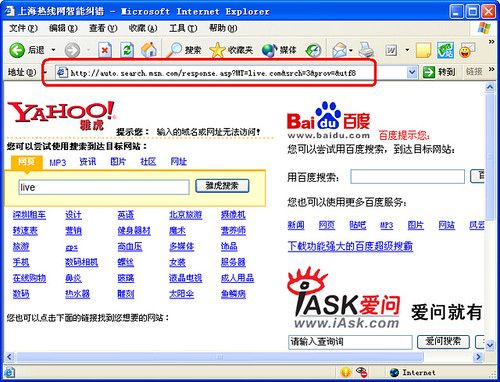
The same problem happens with the Windows Live services, http://live.com.
When you type in http://live.com, it returns this error. Created at 21:40 May 10, 2006 at China Telecom FTTB+LAN in Pudong, China
Other Impact
Since recently, MSN transformed its passport services (the familiar hotmail logon page) to live.com. When live.com is blocked, as shown above, all Microsoft services related to authentication dies. For example, the popular MSN Spaces, a blogging service, becomes instable because it requires authentication. Other services, like http://download.microsoft.com is also reported to be impacted.
I chatted with my friends who may know the situation. None of them really have any suggestions, except asking me to use a proxy server.
Workarounds
Let me try to give several workarounds I collected. It may work now, but no garrentee it works in near future. Just let me know if any method works or stop working. At least at the time I write this article, I personally tested all the methods. They work at least for me on China Telecom FTTB+LAN home broadband in Shanghai.
Option 1: Use Mobile Version
Only the domain names are blocked. The server is live. If you have ways to access the servers without using the hotmail.com or live.com domain, you have a chance. Here is a backdoor:
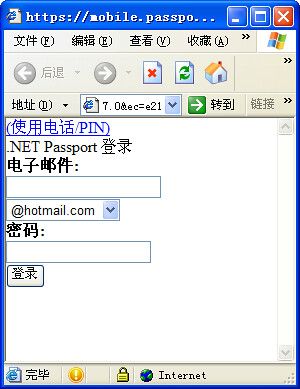
MSN Mobile logon interface
This interface is designed exclusively for Windows Mobile cellphones. You can login to check your emails. The interface is very simple and small - to fit into mobile - but it is better than nothing if you urgently need to check your Hotmail messages.
The reason it works is because, the link I provide will redirect you to this URL:
[https://mobile.passport.net/si/default.aspx?
lc=2052&id=961&ru=http%3a%2f%2fmobile.msn.com%2
fwml%2fmigrate.aspx%3freturl%3dhttp%253a%252f%252f
mobile.msn.com%252fhm%252ffolder.aspx%26fti%3dy&
mlc=zh-CN&mspsty=302&tw=1814400&kv=7&ct=1147269673
&ns=hotmail.com&ver=2.5.1027.0&ec=e21](https://mobile.passport.net/si/default.aspx?lc=2052&id=961&ru=http%3a%2f%2fmobile.msn.com%2fwml%2fmigrate.aspx%3freturl%3dhttp%253a%252f%252fmobile.msn.com%252fhm%252ffolder.aspx%26fti%3dy&mlc=zh-CN&mspsty=302&tw=1814400&kv=7&ct=1147269673&ns=hotmail.com&ver=2.5.1027.0&ec=e21)
It does not use the hotmail.com or live.com domain
Thanks for this article to share this methods with me.
Option 2: Using MSN Messenger 7.0
If you have MSN Messenger 7.0 or 7.5 (I am using 7.5) on your computer, you can simply click on the Mail icon to enter Hotmail. It is still using the old passport service, not live.com. Please make sure you are using these versions, not MSN Messenger 8.0.
Option 3: Logon to Passport First
If you feel the mobile version is not acceptable, try this.
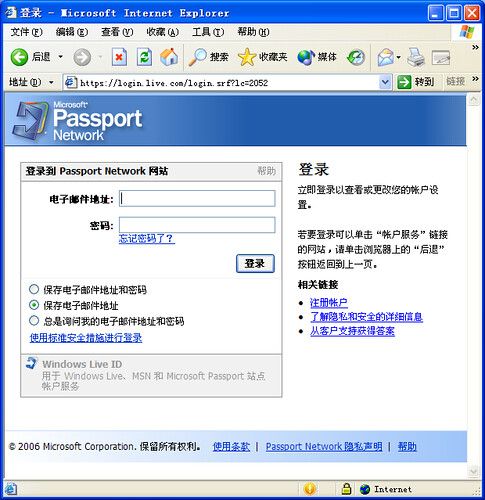
Passport logon page
Also live.com is not accessible, https://login.live.com is OK. Please note the URL is https:// instead of http://.
After you enter your Hotmail username and password, you will see the MSN Account Services page. Click the hotmail link on the left top of the page, and you should be able to access hotmail.
Option 4: Direct URL
This URL works for me. But I have no idea about whether it works for you. Let me know your feedback.
[https://login.live.com/login.srf?lc=2052&sf=1&id=2&ru=
Option 5: Use Outlook Express
Just configure Outlook Express to check emails from hotmail.
If you haven’t done it before, here are the steps:
Go to Start -> All Programs -> Outlook Express.
Tools -> Accounts -> Add… -> Mail
Display Name: Your real name, click Next.
Email address: yourname@hotmail.com, click Next.
Accept defult HTTP as server, Hotmail as provider, and click Next.
Enter your user name and password, click Next.
Click Finsih. Then click Close to close the account tab.
Then you will have all your mails in your hotmail in your mailbox.
I’d like to hear your feedback about what option worked and what didn’t. If it didn’t work, please post comments and let people know what you have tried, where are you, and which provider you use.
Good luck!
Option 5: Use Torpark.
Thanks for Amelia’s recommendation. Download Torpark may solve the problem. (I didn’t verify it yet).
94 Comments
Over de past few weeks I have been in touch with Ben Edelman who has been running the filter program in the past: the interface does not work well anymore at this stage and Ben has left Harvard recently.
There has been some discussion on the block of blogspot during the last holidays, as in some regions people could access it without proxy. That is over now. For more info you can look at my blog at chinaherald.blogspot.com (you do need a proxy now).
Fons
On another note, for some reason, my Hotmail account refuses to read Chinese characters, even on machines that use a Chinese character platform. I can read Chinese characters on everything else besides Hotmail. I contacted their support, they always send back a canned response "install the characters" ... no help, I've done that. Anyone have a clue what I can do?
In IE, point to Encoding on View menu and click on Chinese Simplified (GB2312).
Lu Heli
the msg for the server is ...."This is an automatically generated Delivery Status Notification. Unable to deliver message to the following recipients, due to being unable to
connect successfully to the destination mail server...." OR ..."This is an automatically generated Delivery Status Notification. THIS IS A WARNING MESSAGE ONLY. YOU DO NOT NEED TO RESEND YOUR MESSAGE. Delivery to the following recipients has been delayed....."
But my friend never got my mails!!! What is the problem?
the msg for the server is ...."This is an automatically generated Delivery Status Notification. Unable to deliver message to the following recipients, due to being unable to
connect successfully to the destination mail server...." OR ..."This is an automatically generated Delivery Status Notification. THIS IS A WARNING MESSAGE ONLY. YOU DO NOT NEED TO RESEND YOUR MESSAGE. Delivery to the following recipients has been delayed....."
But my friend never got my mails!!! What is the problem?
I'm in Guangzhou.
Any ideas as to why the recent and total problem with Hotmail (I've now checked from a number of computers and IPs and nothing fixes the problem.)
Are others experiencing the same?
it's frustrating, gmail and yahoo work well though...
help!
https://login.passport.net/uilogin.srf?lc=1033&id=2
I found that tip somewhere on the web and it works here in Guangzhou after a frustrating few days of zero access. I think it is another pathetic Microsoft stuff-up not a Chinese Govt thing at all.
Pls do not hesitate to inform me by yanghuaitao[a]gmail.com
Mikes link doesnt work (isnt that the link that hotmail.com points to anyway?). Set up outlook express and it seems to work for me. this is quite strange. hahahah man i was just pinging hotmail to get there ip and then use that and it just started working again lol guess they sensed my anger
hotmail works with the secret signin link!
yeah!
Anyone has any more tricks to solve this problem?
I have been reading all of you comments and have been in the same boat. For two weeks have only had one days access. I am in Guangdong Province. BUT...I have a solution. Go to google, type in Torpark and download it. It is a small file. Extract it and use the exe. file. It will open up a window and you can use this to get into you hotmail. This may take a couple of goes as it did me but I finally got in. I had the Beta version which I just opted out of...now I can open my hotmail from my messenger. I think this should work. I also sent an email to hotmail complaining and now that I just accessed my hotmail it said that this issue is only in China and they are "attempting to fix as soon as possible blah blah" I love my hotmail and have had it so long so it would be a great pain to change now. I am giving them another chance as it is ok for now but I advise everyone to not sign up for the Beta version for now. Fingers crossed this fixes all of you problems. Good Luck!
Read the posts and you will have some idea. Hotmail are admitting that there is no access to any website that uses the Net Passport Log in...whose fault it is has not really been determined. Read my previous post and this might help your situation. I did it for me and my partner and now we can get into hotmail through messenger...hope it helps.
It worked for me in Shanghai. You are a life saver.
Xie-Xie, CJ
!!
!!!!
!!!!!!!
I am glad it worked for you. I think the problem is that a lot of you have the Beta version of hotmail and you can't even get in there to change it back to the original. Using Torpark will allow you to get in, then you can change it back....Then you can use any messenger to get into your hotmail. I am using the Beta Version of messenger and have no problems. It is really worth using as it is quite a quick fix...Good Luck!
I, have been experiencing tough problems with Hotmail for a few weeks now and I would like to thank you for the first link you sent and the advice, at least I could send emails to my friends! Although I will be switching to another provider, because this is too risky, not knowing if you will be able to send emails or not when you really need it. Xie xie! (I live in China)
thank you once again gordon markendale
Disclaimer: I worked for Microsoft before.
I believe that the more noise we make, the stronger the baddies become. Let's just thank God for some intervention that has brought some use of communication back to the few. We are the lucky and chosen ones, as we do communicate, and that is a skill as well as a gift. The Beta Hotmail is up and running, aol has slowed down considerably, etc. Someone out there is really SICK and we should keep quiet for him or them to just go away from frustration.
This is probably a result of the Chinese government control and Microsoft control hitting us at the same time - who cares, as long as we can go forward. So long as the few can communicate with the few, there is hope......
Many thanks
It's my personal, private mail, I don't understand this operation, we have to make some thnig.
I need my HOTMAIL, help!!!!!! I'm from Barcelona (Catalunaya, Spain); LUCK TO ALL!!!
Tot, el que es pugui dir es poc..... Quina PUTA MERDAAAAAAAAAAAAAAAAAA!!!!!
Sort a tots i el que ho solucioni, que avisi.
We want to come across as serious, mature and reliable users of the web, not desparadoes looking for stimulus or quick thrills.
Some of us are reliant upon hotmail for communication with our families back home - this is a serious business, mate!
Please think in future, Joe, and if you cannot think of anything constructive to say then keep quiet. Thanks.
Again, thanks - in whatever way necessary - to Wang Jian Shuo for this website.
I am not going to get into the little argument going on here, I just want to remind you of the tip that I have given but no one seems to be reading....Go to google, download a free small program called Torpark. You just download unzip and click on the .exe file. You can put this on a USB disk and take it to the internet cafe or anywhere when you access your hotmail. What it does is block your ip address so they can't detect where you are coming from. (Seeing as hotmail is blocked in China) I used this program to change my live beta hotmail back to the old one and now I can access hotmail through messenger but if you don't have messenger or want to access it through hotmail.com you can just load this program anytime anywhere and it will work. I hope this helps people as it seems like everyone is still having problems. I was going crazy not having access for a week a couple of weeks ago and I really feel sorry for those who still have problems. I hope this helps anyway, if you have any problems just leave a message. Actually here is the link for torpark while I think of it: torpark.nfshost.com/
Good Luck...
Can you not hear the resounding laughter at you? Actually, Joe, you're okay in my eyes, obviously, you're not an adult that is actually living in China [even the worst language school cannot be so desperate]. I see your problem, Joe, I feel your pain -you're just an adolescent playing around on the computer - still titillated by images of female curves on the internet but being shunned by them in real life. Don't worry, Joe, my old chap, it's just a phase you're going through - one day you'll go to college, one day you'll not blush and stammer if a gal so much as looks your way, yes, one sweet day, the world will open up for you. Until then please don't come on grown up sites like these or mommy and daddy will get real sore at you. Atta boy!
i tried 'Torpark', but it still doesn't work ! I'm getting crazy...
I need HOTMAIL... the only link that works is "the mobile thing..."
But that's not good enough. Outlook is not free... So I can not use it.
MSN is allso not working!!
Help me
Firstly, can you at least download the program? When you download it, double click on the icon and select run, then choose a folder where you want to extract it to. When done you should have a folder saying english (if you downloaded the english version) open it. Then open the folder torpark. There should be 5 folders and then an icon named Torpark. Click on the icon and wait. If it disappears and doesn't bring up an internet window, click on it again until you get the window. At first you probably have to click on it at least twice. When you get the internet window you should be able to access any site, including hotmail.com or whatever way you use to get into hotmail. If you have the new beta live version of hotmail I suggest you revert back to the old hotmail - you should then be able to get in via messenger (the old or beta version) If you don't use messenger then you can use torpark every time to get into your hotmail. It might be a little slow at first, depending on the computer but I am positive it should work. This can be taken on a portable USB disk so you can use it on any computer that you go to. Have another try and see how you go. Just be patient - I was going nuts with no hotmail. I could see on my messenger that I had all these new emails but I couldn't get in. Be patient with Torpark and it will work. Let me know if you have any more problems and or success. Good Luck Mikee!
Amelia
My hotmail is working again... Thank's a lot for your help !!
(your program didn't help)
From where are you ?
Mikee
As for Jian Shuo Wang: I don't really give a hoot if you worked at Microsoft - this is an IP hit from Microsoft. My sources in Seattle are leaps above any position that you held there and quoted Mr. Gates word for word on his instructions for involvement with Chinese "pain". So there.....
Thanks for your message Michael, I totally agree with your comments and am sure that this is an IP problem from Microsoft - If it wasn't obvious before it is now that Torpark (program that blocks your IP) lets you go to any hotmail, msn, etc. site. I am 100% sure that this should work on everyones computer although as you said Michael, you may need to go to the help pages and adjust some settings. It worked straight away for me. I don't usually get involved with forums or things on the internet but I really feel passionate about this because it is terrible not to have email, especially being overseas and this is sometimes the only contact people have with back home and people often rely on it so much for business. Anything that I can do, I am happy to help. Mikee...I am from Australia. Take Care Everyone,
Amelia.
I couldn't go through that crap of May again, could you?
Microsoft is "working" on their new Beta Mail and the old Classic. Try opting for the classic and listen to Shanna - change your country to China and a large City like Shanghai, Guangzhou, etc.
The other links seem to have gone South for the winter, but Hotmail is actually okay.
enjoy !
alternatively you could try cn.msn.com if you can muddle your way through the chinese to the email button then that might also be a route.
really interesting and informative article. Keep posting. Nice work, thanks for such information.
: nina.xu.2008@hotmail.com.cn ? I am sending from singapore, thank you very much!